API and Developer Integration
You can use the REST API to read and change BATCAM FX2 settings and events, and receive real-time measurement data through WebSocket. This page explains where to find the API documentation, how to authenticate, and which addresses to use.
REST API
The device provides a REST API over HTTP port 80. Most settings available in Device Manager are also available through the API.
1. API documentation
You can open the API documentation in a browser without authentication.
http://<device-ip>/api-docs- Format — Swagger UI
- Languages — English, Korean, Japanese, Simplified Chinese, and Vietnamese. Select a language from the list at the top of the page.
- Test requests — Use “Try it out” for an operation to send a request directly to the device.
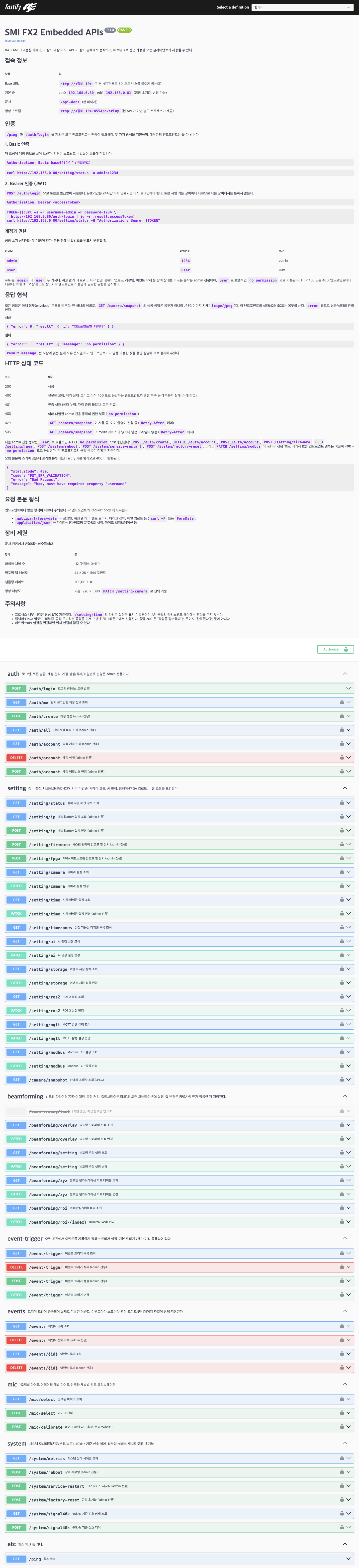
※ The “API Documentation” link in the top bar of Device Manager opens the same address in a new tab.
2. Authentication
The REST API supports two authentication methods. The operations that do not require authentication are /ping, /auth/login, and the API documentation.
- Basic — Send the account ID and password with each request.
- Bearer token — Log in through
/auth/loginto obtain a token, then include it in requests. Tokens are valid for 24 hours; you must log in again when they expire. Tokens are specific to each device.
Some operations can be called only by an administrator account. Calling them with a regular user account returns a no permission error. The API documentation identifies administrator-only operations.
Pre-release software (v1.1.1-beta.1)
This information is based on firmware v1.1.1-beta.1 and may change in the official release.
Updating the firmware to v1.1.1 invalidates previously issued tokens. A factory reset does the same. Log in again to obtain a new token. The same may happen with later updates. Basic authentication is unaffected.
※ If a page on another site calls the device REST API from a browser using Basic authentication, the request is rejected (403). Browser apps should use a login token (Bearer). Non-browser programs are unaffected.
3. Example requests
Check whether the device responds. No authentication is required.
curl http://<device-ip>/pingExample response:
{"error":0,"result":{"text":"pong"}}Log in to obtain a token. Send the login request as multipart/form-data, not JSON.
curl -X POST http://<device-ip>/auth/login -F username=<ID> -F password=<password>Example response:
{"error":0,"result":{"tokenType":"Bearer","accessToken":"<token>","expiresIn":86400}}Use the token to read device information.
curl http://<device-ip>/setting/status -H "Authorization: Bearer <token>"With Basic authentication, send the ID and password directly.
curl http://<device-ip>/setting/status -u <ID>:<password>- Successful response —
{"error":0,"result":...} - Failed response —
{"error":1,"result":{"message":"..."}} - Exception — A successful camera snapshot request (
/camera/snapshot) returns a JPEG image.
WebSocket
Receive real-time measurement data through WebSocket.
ws://<device-ip>/ws- Authentication — In firmware v1.1.0, WebSocket does not require an account.
- Encryption — None (ws, plaintext).
- Subscription — After connecting, you must subscribe to the data you want to receive. No data is sent before you subscribe.
- Data types — 0 Beamforming, 1 WsAudio, 2 LPointAudio, 3 PdDetection, 4 LeakDetection
Pre-release software (v1.1.1-beta.1)
This information is based on firmware v1.1.1-beta.1 and may change in the official release.
- Authentication — A device account. Both administrator and regular user accounts work. If stream authentication is disabled, you can connect without an account.
- Encryption — None (ws, plaintext). Basic account credentials are also unencrypted.
- Non-browser programs — Include an
Authorization: Basic …orAuthorization: Bearer <token>header in the connection request. Request thesubscribesubprotocol. - Browsers — Because browsers cannot add the header, request both the
fx2-wsandfx2-token.<token>subprotocols. Do not put the token in the address. A page on another site that connects using Basic authentication is rejected (403). - If account verification fails repeatedly, that address is blocked for 60 seconds. For details, see Security and Accounts in External System Integration.
Example subscription request:
{"type":"subscribe","id":1}※ The device sends data in binary frames. See the Developer Center for the message structure.
Other integration methods
- Video, Modbus TCP, ONVIF — See External System Integration.
- Robots — See ROS 2 Integration.
In firmware v1.1.0, custom triggers added through REST POST /event/trigger are saved but do not record events.
Pre-release software (v1.1.1-beta.1)
This information is based on firmware v1.1.1-beta.1 and may change in the official release.
In firmware v1.1.1, custom triggers added through REST POST /event/trigger also record events when their conditions are met. For registration instructions, see Custom Triggers under Events.
See the Developer Center for request and response fields. Example code is available in the SM Instruments public repositories.