ROS 2 Integration
BATCAM FX2 publishes beamforming results, microphone audio, listening-point audio, and AI detection results as ROS 2 topics. A robot can receive this data and use ROS 2 actions to change the measurement band and overlay settings. This page explains how to connect the robot and device.
Available Features
- Topics — beamforming results, microphone audio, listening-point audio, partial discharge AI detection, leak AI detection
- Actions — change measurement band, change overlay
- Video — firmware v1.1.0 has no video topic. Receive video via the RTSP
/overlaypath. - Level trigger — level trigger results are not published as a topic.
For the message fields of the five topics and two actions, see the Developer Center.
Pre-release software (v1.1.1-beta.1)
This information is based on firmware v1.1.1-beta.1 and may change in the official release.
Starting with firmware v1.1.1, camera video can be received as a ROS 2 video topic, bringing the total to six topics. See Video Topic below for details. VMS and video viewers continue to receive video via the RTSP /overlay path.
Prerequisites
- Network — the robot and device must be on the same network.
- Domain ID — the robot and device must have the same ROS 2 domain ID.
- ROS 2 distribution — the steps below are based on Jazzy.
- QoS — the device publishes all topics with BEST_EFFORT. Subscribers must also use BEST_EFFORT. A RELIABLE subscriber will not receive data.
Pre-release software (v1.1.1-beta.1)
This information is based on firmware v1.1.1-beta.1 and may change in the official release.
- ROS 2 distribution — we confirmed that fx2_stream_msgs 2.0.0 builds on Humble and Jazzy and that the device’s beamforming results, microphone audio, and listening-point audio topics can be received. The tested environment used Fast DDS (rmw_fastrtps_cpp) and domain ID 0. On Humble, the “sequence size exceeds remaining buffer” warning may appear a few times when subscription starts; in testing, it did not affect data reception.
- QoS — the five topics other than the video topic are published with BEST_EFFORT. The video topic can be received with the default QoS.
Connection Steps
1. Domain ID
Set the domain ID in the Device Manager’s ROS 2 menu.
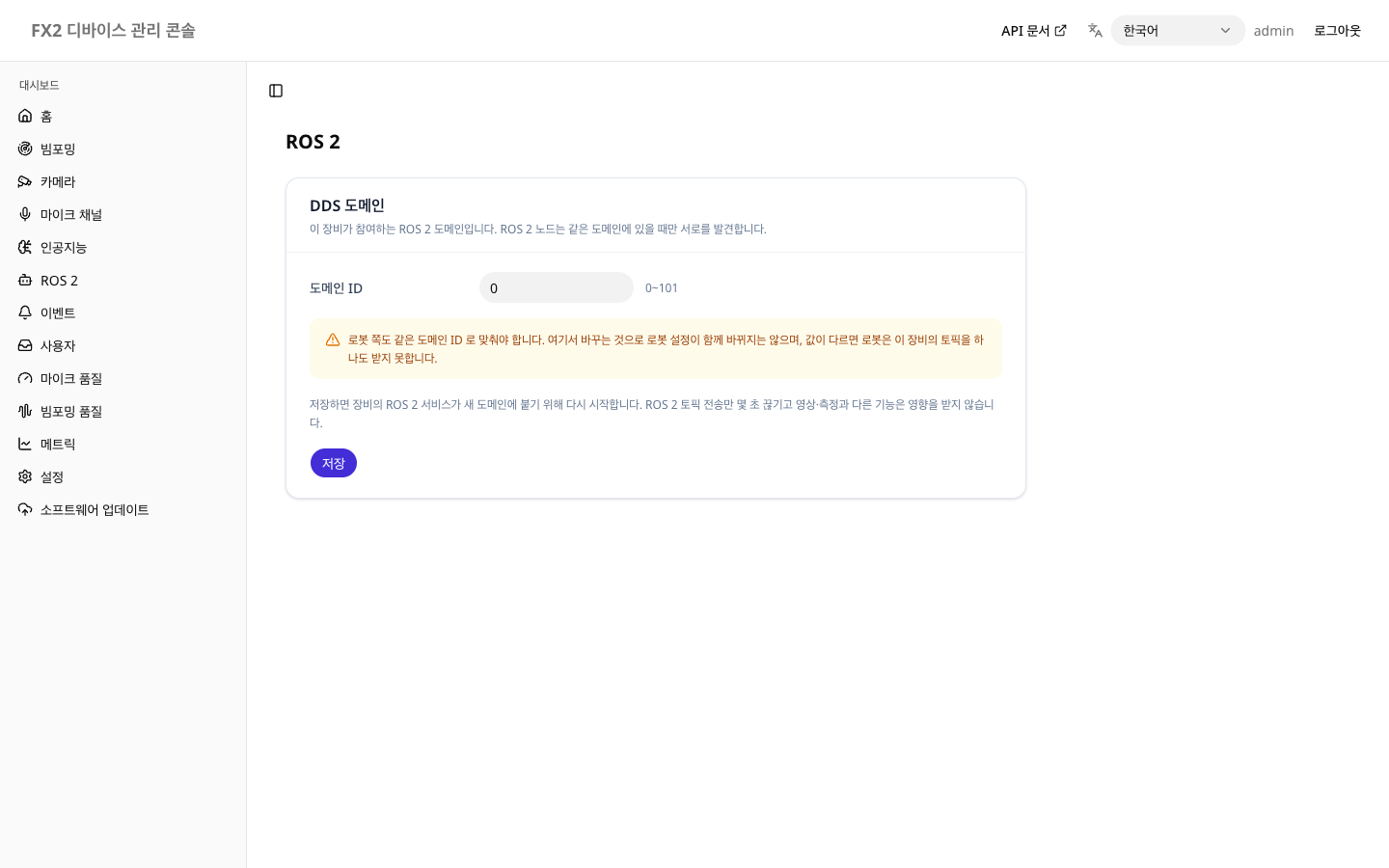
- Domain ID — 0–101. The default is 0.
- Saving restarts only the device’s ROS 2 service. Topic transmission stops for a few seconds. RTSP video, measurement, and other functions are unaffected.
- Saving the current value does not cause a restart.
- You must set the robot’s domain ID separately. Changing it on the device does not change the robot’s settings. If the values differ, the robot will not receive any of this device’s topics.
※ Changing the device’s IP address also restarts the ROS 2 service.
Pre-release software (v1.1.1-beta.1)
This information is based on firmware v1.1.1-beta.1 and may change in the official release.
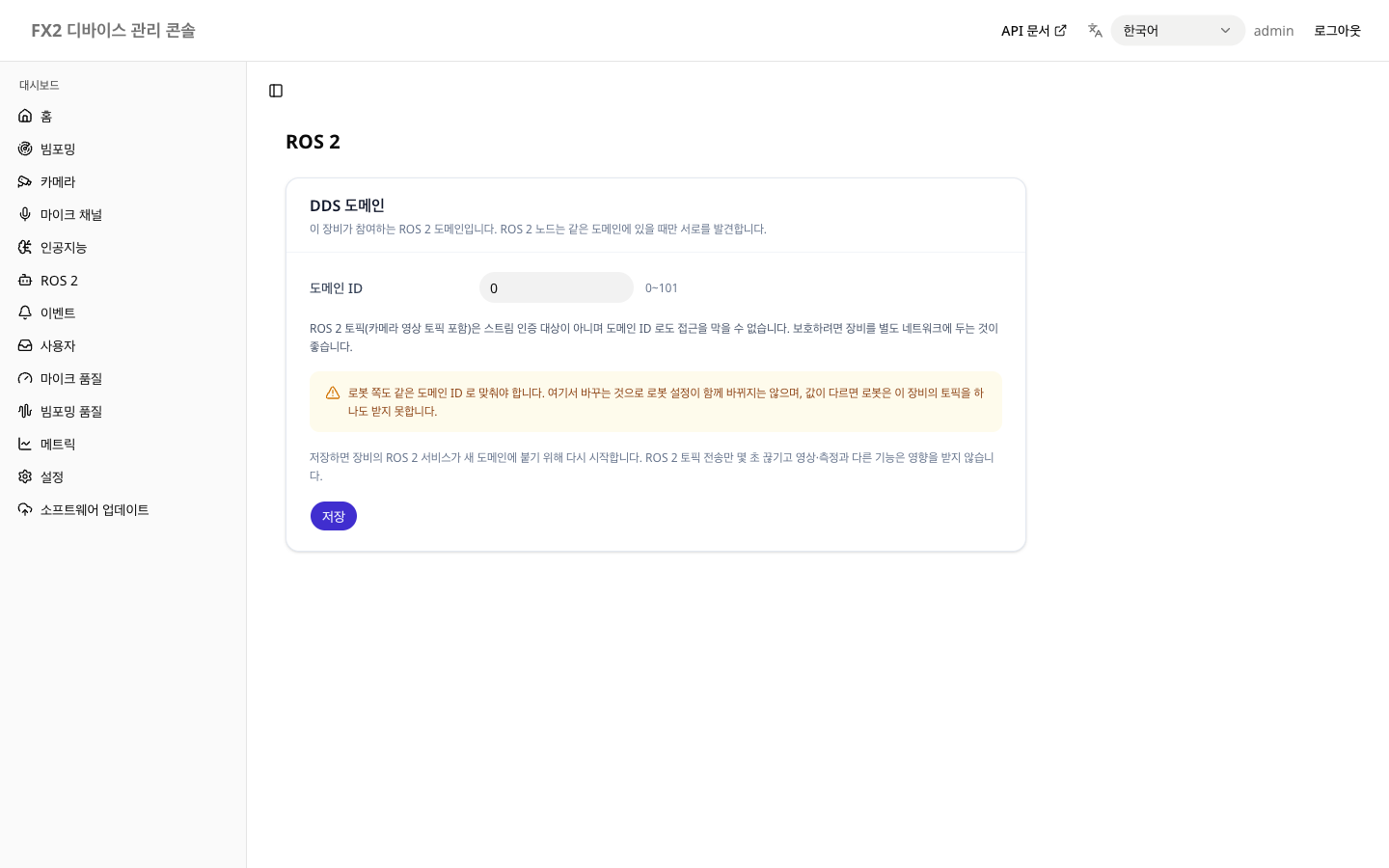
The ROS 2 menu also displays this notice: “ROS 2 topics (including the camera video topic) are not subject to stream authentication, and access cannot be blocked with a domain ID. To protect them, we recommend placing the device on a separate network.”
2. Message Package
Install the fx2_stream_msgs message package on the robot. For firmware v1.1.0, use the following package.
- Package — fx2_stream_msgs 1.2.0
- License — MIT
- Repository — FX2 ROS 2 message repository
Download and build the message package on a PC with ROS 2 and colcon installed. The commands are for Bash and Jazzy.
source /opt/ros/jazzy/setup.bashmkdir -p ~/fx2_ws/srccd ~/fx2_wsgit clone https://github.com/SM-Instruments-Inc/sw2-fx2-ros-stream-msgs src/fx2_stream_msgscolcon build --packages-select fx2_stream_msgssource install/setup.bashros2 interface show fx2_stream_msgs/msg/BeamformingThe last command displays the locally installed message definition. In the next step, check communication with the device.
Pre-release software (v1.1.1-beta.1)
This information is based on firmware v1.1.1-beta.1 and may change in the official release.
- Package — fx2_stream_msgs 2.0.0
- License — MIT
- Repository — public fx-stream-msgs repository on gitlab.com (master branch)
Firmware v1.1.1 requires fx2_stream_msgs 2.0.0. Robot programs built with an earlier version (1.x) must be rebuilt with 2.0.0. Otherwise, they may fail to receive or may misinterpret the beamforming results, microphone audio, and listening-point audio topics.
Download and build the message package on a PC with ROS 2 and colcon installed. The repository also contains fx_stream_msgs, a package for BATCAM FX, so select only fx2_stream_msgs for the build. The commands are for Bash and Jazzy.
source /opt/ros/jazzy/setup.bashmkdir -p ~/fx2_ws/srccd ~/fx2_ws/srcgit clone https://gitlab.com/smins-oss/sound-camera/framework/protocol/fx-stream-msgs.gitcd ~/fx2_wscolcon build --packages-select fx2_stream_msgssource install/setup.bashros2 interface show fx2_stream_msgs/msg/BeamformingThe last command displays the locally installed message definition. If the output contains the line builtin_interfaces/Time stamp, it is version 2.0.0.
3. Check Topics
Check the topic list on the robot.
ros2 topic listThe device’s topic names begin with /fx2/<serial-token>/. The serial token is derived from the serial number under Home → Device Information by replacing every character other than letters, digits, and _ with _. For example, the serial number BFX2-xxxx becomes BFX2_xxxx.
/fx2/BFX2_xxxx/beamforming/fx2/BFX2_xxxx/leak_detection/fx2/BFX2_xxxx/lpoint_audio/fx2/BFX2_xxxx/pd_detection/fx2/BFX2_xxxx/ws_audio/parameter_events/rosout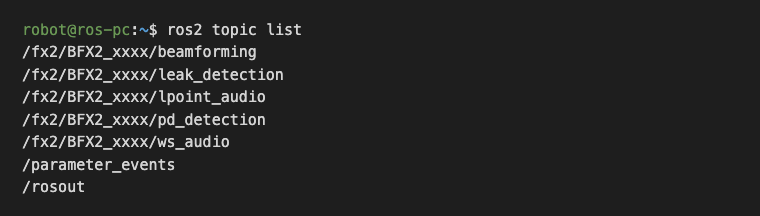
Pre-release software (v1.1.1-beta.1)
This information is based on firmware v1.1.1-beta.1 and may change in the official release.
In firmware v1.1.1, the video topic /fx2/BFX2_xxxx/image/compressed also appears in the list. It is not shown in the image above.
Try receiving data with BEST_EFFORT.
ros2 topic echo /fx2/BFX2_xxxx/beamforming --qos-reliability best_effortTopics
| Topic | Message Type | Frequency | Content |
|---|---|---|---|
| beamforming | fx2_stream_msgs/msg/Beamforming | 25 Hz | Raw beamforming map values (1,144), peak level (dB), and location |
| ws_audio | fx2_stream_msgs/msg/WsAudio | 25 Hz | Audio from the channel selected in the Microphone Channel menu |
| lpoint_audio | fx2_stream_msgs/msg/LPointAudio | 25 Hz | Audio from three listening points |
| pd_detection | fx2_stream_msgs/msg/PdDetection | Approx. 10 Hz | Partial discharge AI detection. Only when PD AI is enabled |
| leak_detection | fx2_stream_msgs/msg/LeakDetection | Approx. 10 Hz | Leak AI detection. Only when LEAK AI is enabled |
Topic names are prefixed with /fx2/<serial-token>/.
Pre-release software (v1.1.1-beta.1)
This information is based on firmware v1.1.1-beta.1 and may change in the official release.
Firmware v1.1.1 adds the following topic.
| Topic | Message Type | Frequency | Content |
|---|---|---|---|
| image/compressed | sensor_msgs/msg/CompressedImage | 25 Hz | Camera video (JPEG). Only when a robot subscribes |
Measurement Timestamp
In firmware v1.1.0 (fx2_stream_msgs 1.2.0), beamforming, ws_audio, and lpoint_audio messages do not have a measurement timestamp field.
Pre-release software (v1.1.1-beta.1)
This information is based on firmware v1.1.1-beta.1 and may change in the official release.
Starting with firmware v1.1.1, beamforming, ws_audio, and lpoint_audio messages include the measurement timestamp stamp.
- Value — the time the device received that frame (40 ms). It uses the same device clock as the video topic’s capture timestamp (
header.stamp). - Same frame — the three topics for the same frame usually have the same
stamp. You can use this value to align beamforming results, audio, and video by time. - Clock changes — because the timestamp follows the device clock, it jumps forward or backward on the frame when the clock changes through a time server (NTP) or manual setting. BATCAM FX2 does not have an RTC (built-in clock).
- AI detection — the
stampin pd_detection and leak_detection is the time the detection message was created, not the measurement time.
Video Topic
Firmware v1.1.0 has no video topic. Receive video via the RTSP /overlay path.
Pre-release software (v1.1.1-beta.1)
This information is based on firmware v1.1.1-beta.1 and may change in the official release.
Starting with firmware v1.1.1, the device also publishes camera video as a ROS 2 topic.
- Topic —
/fx2/<serial-token>/image/compressed - Message type — sensor_msgs/msg/CompressedImage. Because this is a standard ROS 2 message, it can be received without fx2_stream_msgs.
- Video — the topic publishes the same view shown in Device Manager and via RTSP
/overlay. If overlay display is enabled in the Beamforming menu, the view includes the heatmap and any peak marker and level (dB) enabled under display options in the Camera menu. If overlay display is disabled, only the camera video appears. The unprocessed video without an overlay is not published separately. - Format — JPEG. The video dimensions follow the camera’s resolution setting.
- Frequency — 25 Hz
- Transmission condition — the device generates and sends video only while a robot is subscribed. Without a subscriber, the device does not read video or encode it as JPEG for the video topic.
- QoS — it can be received with the default QoS or with BEST_EFFORT.
Check whether video is arriving on the robot.
ros2 topic hz /fx2/BFX2_xxxx/image/compressedIf approximately 25 Hz is displayed, video is arriving. In testing, we subscribed to this topic and received 60 JPEG frames at 1920 × 1080 and 25 Hz; all decoded correctly. To view the video, select this topic in rqt_image_view.
The video topic has no authentication. Anyone in the same DDS domain (with the same domain ID) can view the video without a device account. This is true even when stream authentication is enabled. A domain ID cannot block access either. To protect the video, we recommend placing the device on a separate network.
Actions
- setting_beamforming — changes the measurement band. It uses the same values as the settings in Device Manager’s Beamforming menu.
- setting_overlay — changes the overlay settings.
Action results contain the values actually applied. The measurement band cannot be changed while AI is running.