Product Support and Inquiries
This page provides information about BATCAM FX2 firmware files, development resources, and contact details. It also explains what device information to check before making an inquiry.
What to Prepare Before Contacting Us
You will need your device information when making an inquiry. In Device Manager, go to Home → Device Information and check the following values.
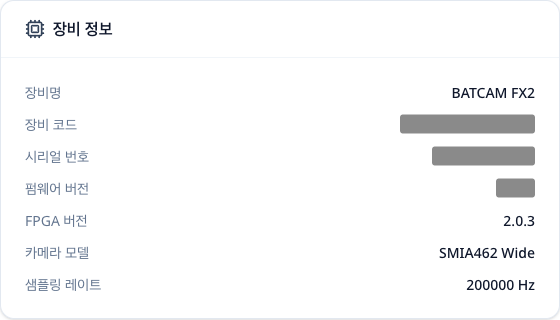
- Device name
- Device code
- Serial number
- Firmware version
- FPGA version
- Camera model
If you encounter a problem, also tell us when it happened, which screen you were on, and what you were doing. For possible solutions, consult Troubleshooting first.
Firmware Files
Request firmware and FPGA files through Product Support and Inquiries.
- Firmware files vary by camera. Obtain the file that matches the camera model shown on the Home screen.
- For installation instructions, see Firmware Update.
- For camera-specific file names and FPGA compatibility, see Firmware Version Information.
Development Resources
API documentation and integration details are available in the Developer Center. Example code is available on GitHub.
- Developer Center — API and integration documentation
- GitHub — SM Instruments public repositories
- API documentation built into the device —
http://<device-ip>/api-docs
For information on using the API, see API and Developer Integration.
Open-Source Code Availability
BATCAM FX2 firmware includes open-source software. The source code is available in the open-source category on the FX2 download page. For inquiries, see Contact Information.
Contact Information
- Company — SM Instruments Co., Ltd.
- Phone — 042-861-7004
- Email — sales@smins.co.kr
- Website — SM Instruments website